Empathy Exprience
UI/UX Designer
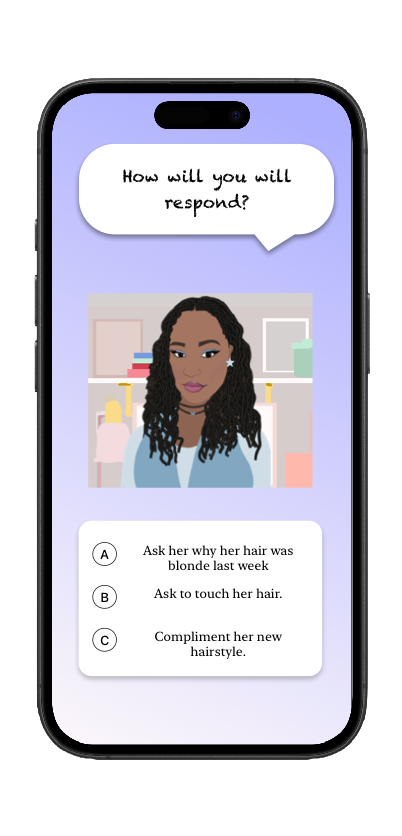
Empathy Experience is an interactive mobile app designed to help build empathy through scenario-based game play. This project was developed in collaboration with our client, Jazmine Meadows, whose passion for social justice and advocacy for people of color shaped the foundation of the project.
Tools Used:
Sketch, Xcode, SwiftUi, Miro, Procreate
Date
November 10-December 11 2025
Case Study - Jazmine
Empathy Experience is an interactive mobile app designed to help users build empathy through scenario-based game play. This project was developed in collaboration with our client, Jazmine Middlebrooks, whose passion for social justice and advocacy for people of color shaped the foundation of the project.
This app was designed within a growing digital landscape where mobile apps are increasingly used for education, self-reflection, and social awareness. Interactive mobile platforms present a strong opportunity to reach diverse audiences and create meaningful, accessible learning experiences.
Challenges
Users may struggle to:
Fully understand perspectives outside of their own lived experiences
Stay engaged with educational content that feels overwhelming or one-sided
There is a lack of safe, guided environments for exploring sensitive topics
Conducted user research through surveys and interviews, synthesizing insights into key themes that informed user personas, user flows, and overall design decisions centered around empathy and social awareness.
Designed high-fidelity wire-frames and interactive prototypes in Sketch, translating concepts into intuitive, user interfaces while creating custom icons and avatars to support a cohesive visual system.
Collaborated on project planning and time management, contributing to design iterations, feedback cycles, and ensuring alignment across the team throughout the product development process.
My Responsibilities

User Persona/ Client:
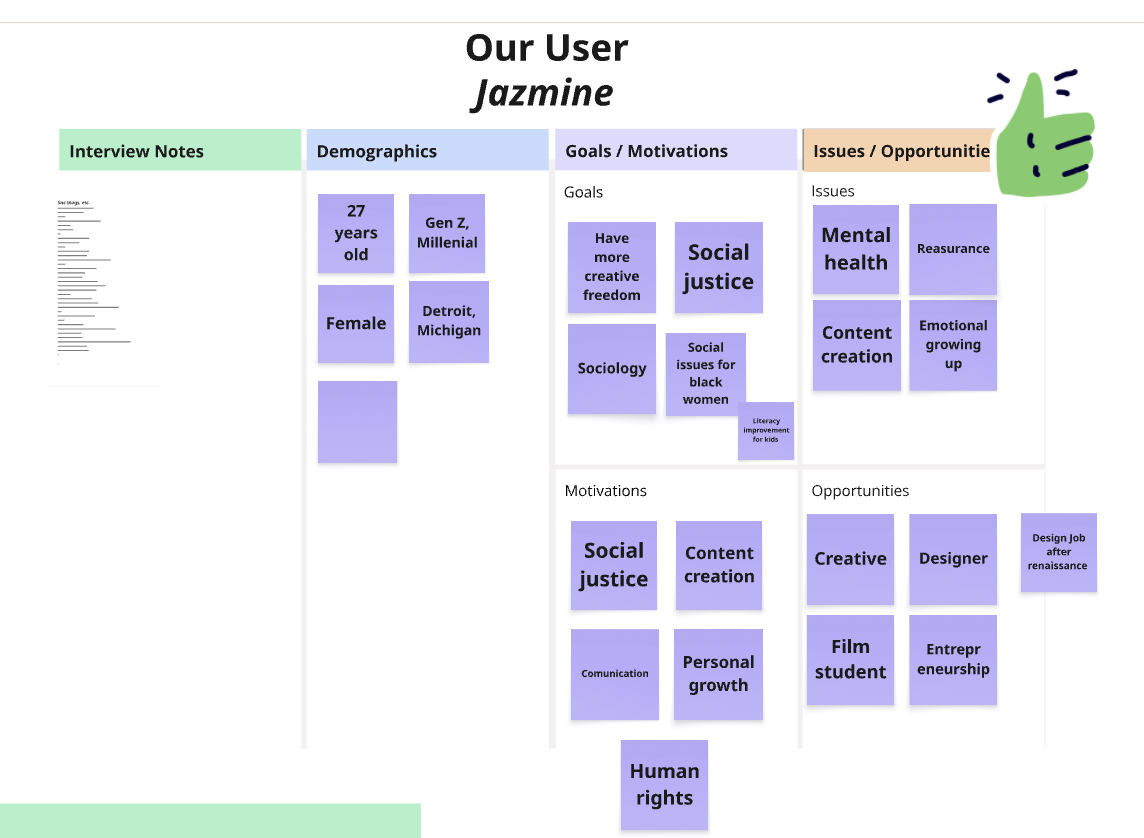
Jazmine Middlebrooks
28
Tutor
Single
Detroit, MI
What problem does Jazmine want to solve?
Jazmine is passionate about raising awareness around social justice issues. She often engages in discussions about micro-aggressions experienced by people of color and recognizes that these conversations can become unproductive. Rather than debating, she is motivated to educate others and promote empathy by helping them better understand the importance of diverse perspectives and lived experiences
The participants chosen for interviews and surveys were people of color who have experienced micro-aggressions in professional or academic environments.
Investigate
Here are a few example of the questions and responses we received during our in person interviews.
Questions/Surveys
Interview Questions
What are some problems you face in the workplace as a person of color?
“Micro-aggressions towards my appearance such as my hair as a black woman.”
“Being a muslim woman can clash with the work culture such as avoiding hand shakes with men due to religious beliefs.”
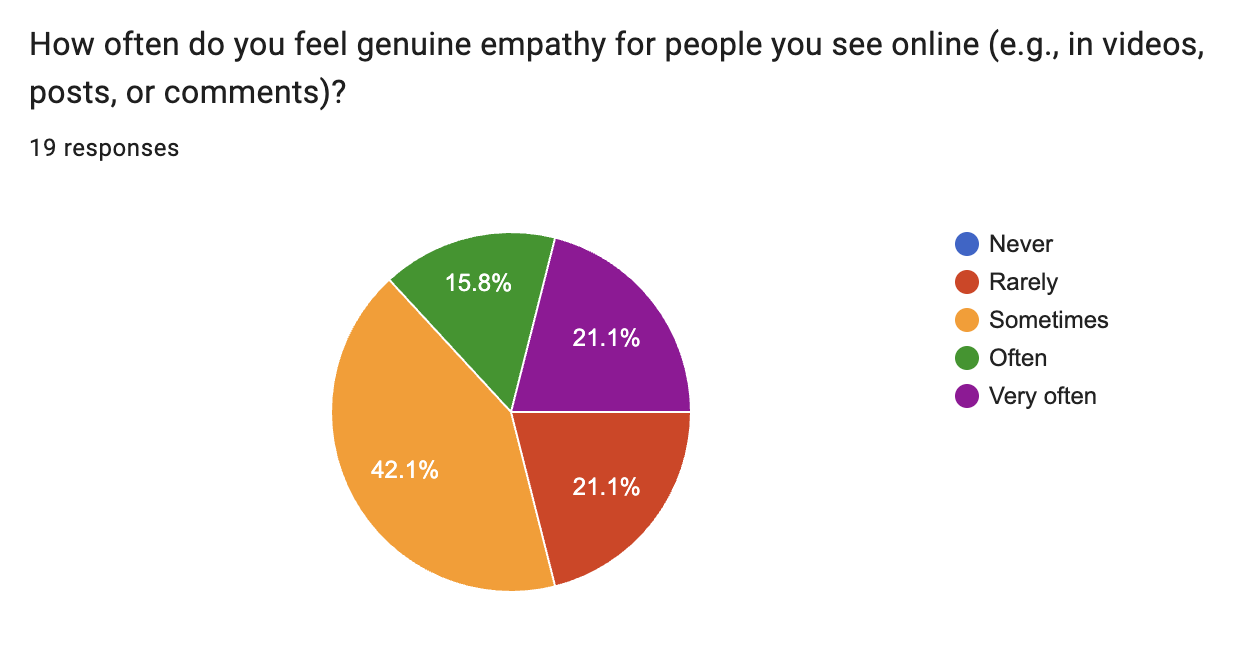
Survey Questions
Wireframe
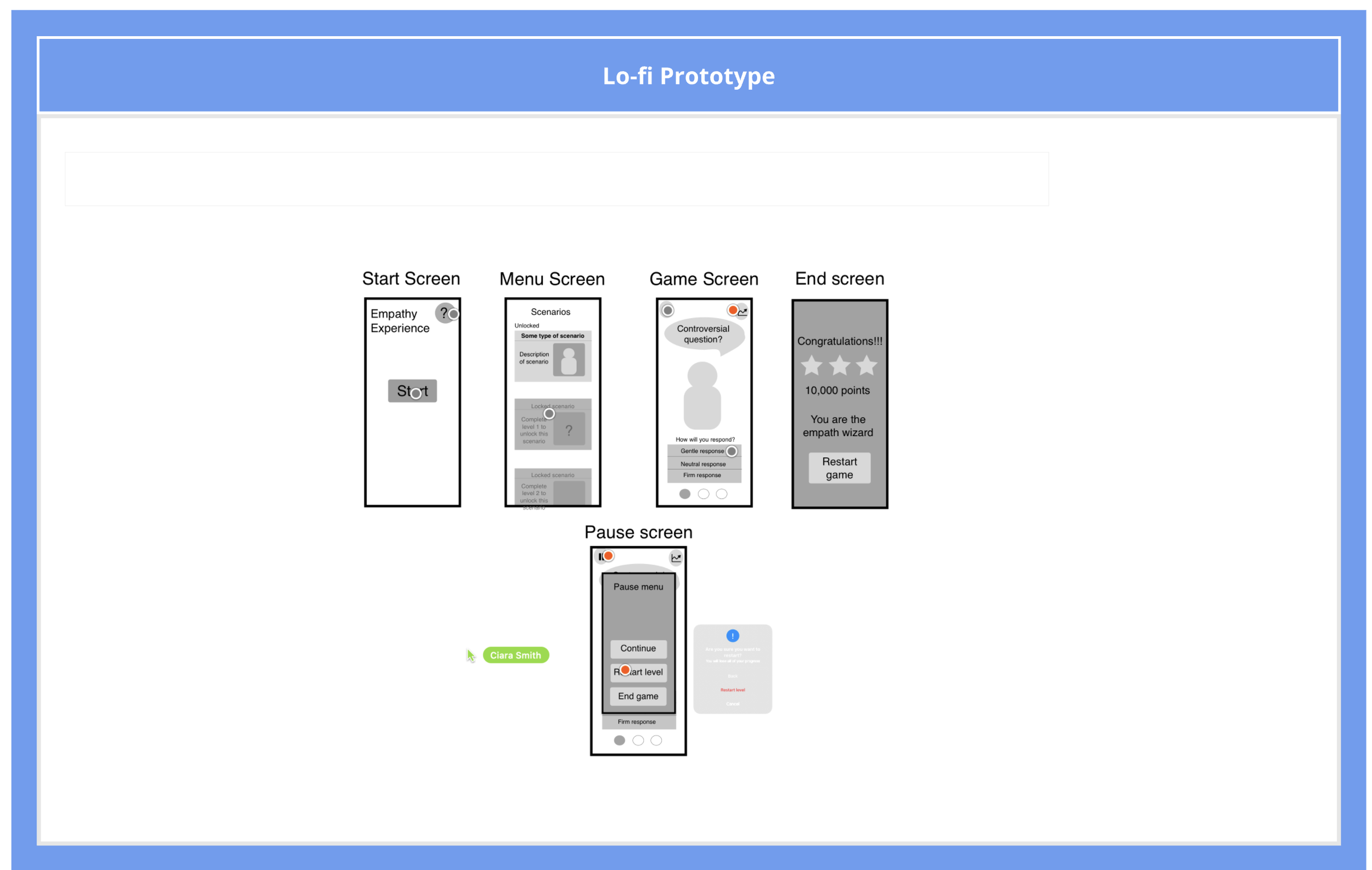
This wireframe focuses on defining the core user flow and structure of Empathy Experience.
The Start Screen introduces the app with a simple call-to-action
The menu Screen allows users to browse and select scenarios
The Game Screen presents the core interaction, where users respond to scenario-based questions
The Pause Screen provides control and flexibility during gameplay
The End Screen delivers feedback and reinforce engagement through results and rewards
Style Guide
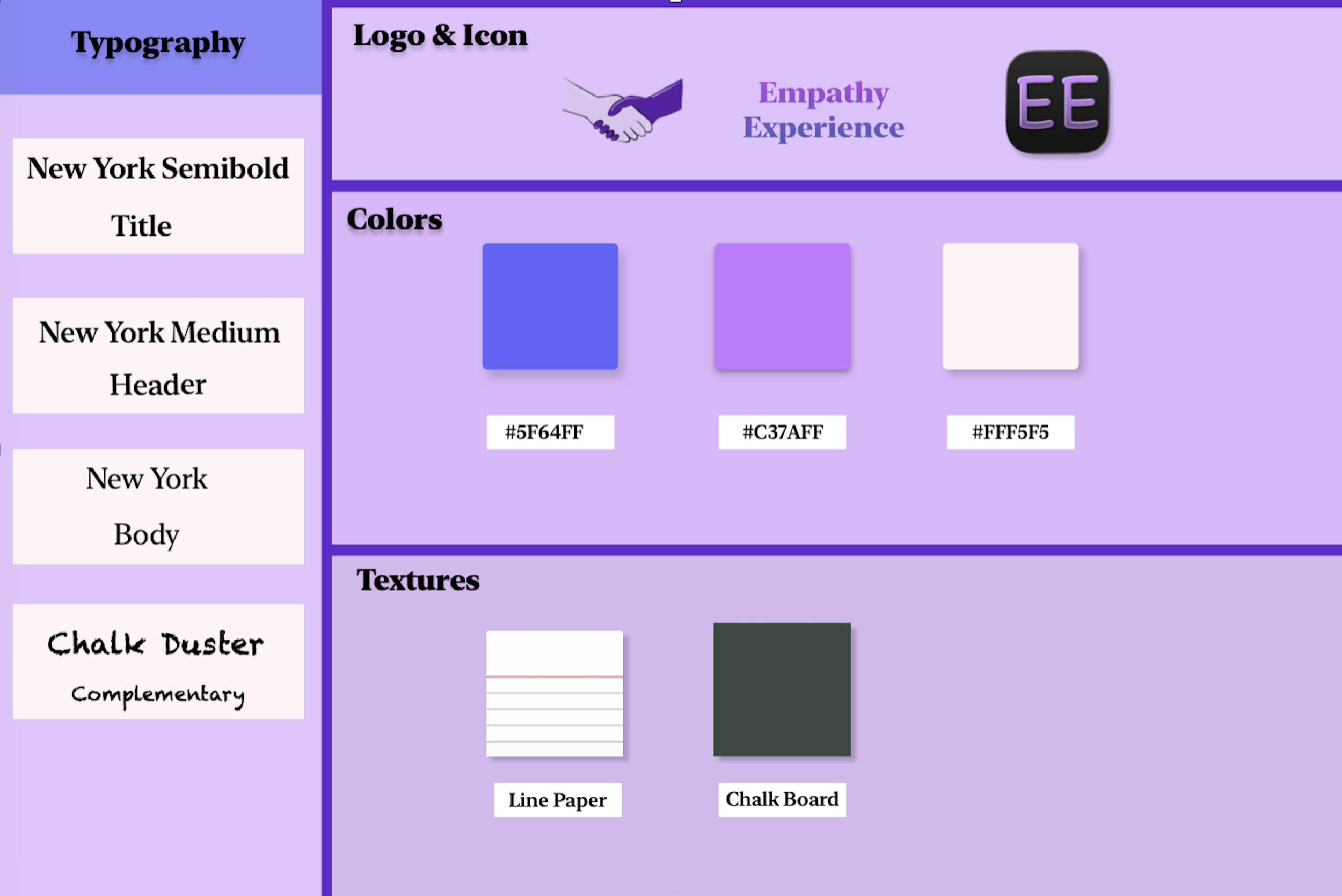
The visual design of the app was intentionally crafted to support a calm, reflective, and emotionally aware user experience.
Color Palette:
Purple and blue tones were chosen to evoke empathy, trust, and understanding reinforcing the app’s purpose of fostering meaningful reflection.
Typography:
New York (Semibold, Medium, Body) provides a clean, structured, and professional feel, supporting clarity and accessibility.
Chalk Duster is used as a complimentary font to reflect the educational theme of the app.
Logo:
The handshake logo represents connection, understanding, and mutual respect core values of the app. It visually reinforces the idea of bridging perspectives and encouraging empathy between individuals from different backgrounds.
Textures:
Subtle textures, such as lined paper and chalkboard elements, were incorporated to reflect a learning environment.
Line paper suggests reflection, and personal thought
Chalkboard texture connect to teaching, guidance, and learning
High Fidelity
Welcome Screen
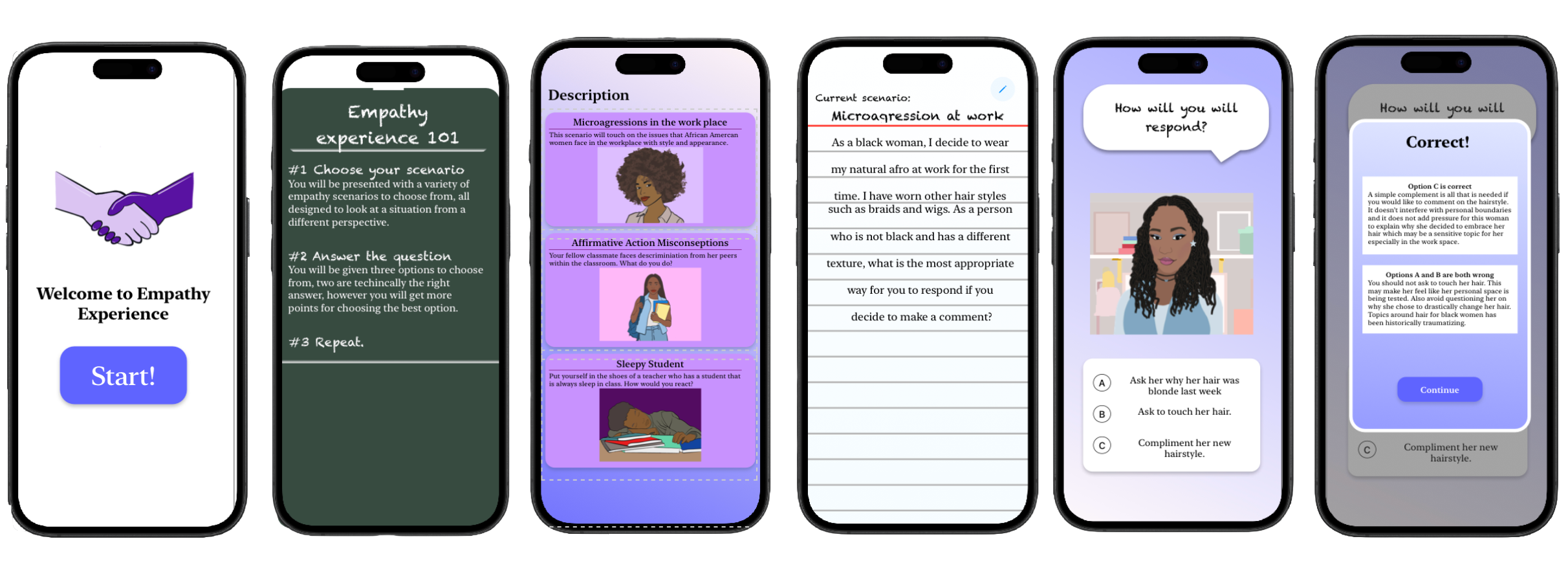
The onboarding screen introduces users to the app with a simple and inviting layout, encouraging them to begin the experience with a clear call-to-action.
Instructional Screen (“Empathy Experience 101”)
Guides users on how the experience works, including choosing scenarios, answering questions, and progressing through the app.
Scenario Selection Screen
Users can choose from different real-world inspired scenarios, such as workplace micro-aggressions and classroom experiences. This allows users to engage with topics that are relevant and meaningful.
Scenario Context Screen
Provides additional background information to help users better understand the situation before making a decision, reinforcing the educational aspect of the app.
Interactive Decision Screen
Users are presented with a character and a situation, followed by multiple response options. This screen encourages active participation and critical thinking.
Feedback and Results Screen
Users receive immediate feedback on their choices, along with explanations that promote reflection and deeper understanding of the situation.
Reflection-Future Features
Reflection
Throughout the design process of Empathy Experience, my team and I learned the importance of making design decisions based on real user experiences, especially when addressing sensitive topics such as discrimination.
This project strengthened my understanding of the UX process, such as user research, wire-framing, prototyping and high-fidelity design. I also gained experience translating complex, real-world issues into interactive, user-centered solutions that are both engaging and educational.
Future Features
Expanding scenario diversity
Introduce a wider range of scenarios across different environments (public spaces, social settings) and identities to reflect a broader spectrum of lived experiences.
Enhanced feedback and reflection
Improve the feedback by providing more detail explanations after each decision, including context on why certain responses may be harmful or appropriate, and encouraging user reflection.
Progress tracking and learning journey
Add a system that tracks user progress, helping users see their growth in understanding and encouraging continued engagement with new scenarios
Accessibility Improvements
Continue refining the experience to ensure it is inclusive and accessible, including clearer language, readable layouts, and supportive design for users with different needs.